 GST & indirect tax
GST Invoice Format in 2026: Mandatory Fields, Numbering Rules and How to Make an Invoice in Excel
GST invoice format for 2026: every Rule 46 field, the 16-character number rule, bill of supply, e-invoice limit and how to make a GST invoice in Excel.
 Edited by Sumeet YadavFounder & editor, MSMETOOLS · fact-checked against official sources
Contents (10)
- 1. What a GST invoice must contain: the Rule 46 checklist
- 2. Invoice number format: the 16-character rule
- 3. Tax invoice vs bill of supply vs other documents
- 4. When to issue the invoice, and how many copies
- 5. E-invoicing: when Excel stops being enough
- 6. How to make a GST invoice in Excel, step by step
- 7. Rounding: per line, per invoice and in returns
- 8. Worked example: a GST invoice in ₹
- 9. Common invoice mistakes and how to fix them
- 10. What to do next
Every GST-registered business issues invoices, and most small ones start in Excel. That works — the law doesn't require any particular software — but only if the invoice carries every detail Rule 46 asks for, numbers are kept in the right series, and the tax is split correctly between CGST/SGST and IGST. This guide is for shop owners, freelancers, manufacturers and accountants who want to get the format right. It lists every mandatory field, the invoice numbering rules, when to issue a bill of supply instead, deadlines and copies, the e-invoice threshold, and then walks through building a GST invoice in Excel with working formulas and rounding. All rules were checked against the CGST Act and Rules on CBIC's site in October 2026.
Quick answer
A valid GST tax invoice must show the details listed in Rule 46 of the CGST Rules — supplier and buyer GSTIN, a unique serial number of up to 16 characters, date, HSN/SAC, description, quantity, taxable value, tax rate and amount, place of supply and reverse-charge status. You can prepare it in Excel unless your turnover makes e-invoicing compulsory.
E-invoicing (IRN + QR code) is mandatory above ₹5 crore aggregate turnover
Services: invoice within 30 days of supply; goods: at or before removal or delivery
No tax charged (composition, exempt goods)? Issue a bill of supply instead
Keep invoices for 72 months from the due date of the annual return
What a GST invoice must contain: the Rule 46 checklist
Section 31 of the CGST Act says a registered person supplying taxable goods or services must issue a tax invoice, and Rule 46 of the CGST Rules lists what it must contain. Missing a field doesn't just look untidy — your buyer's input tax credit depends on a valid invoice, and section 122 lets officers impose a penalty of at least ₹10,000 for issuing an incorrect or incomplete one.
Rule 46 — fields every tax invoice needs
0/15A few of these need explanation.
Buyer details for unregistered customers. For a B2C sale, the buyer's name and address are compulsory only when the value is ₹50,000 or more, or when the buyer asks for them. Below that, a retail invoice can say just "cash" or the customer's name. For services sold through an e-commerce operator or online database services to unregistered buyers, the state of the recipient must be shown regardless of value.
HSN or SAC digits. Under Notification 78/2020-Central Tax, businesses with aggregate turnover up to ₹5 crore in the previous year must show at least 4-digit HSN on B2B invoices (it's optional on B2C invoices), and those above ₹5 crore must show 6-digit HSN on every invoice. Our HSN code guide and HSN code finder help you get the code right.
Place of supply. It decides whether you charge CGST + SGST (same state) or IGST (different state). For goods it's usually where delivery ends; for most B2B services it's the buyer's registered location; for services related to immovable property it's where the property is. Show it as "state code–state name", for example 27-Maharashtra, because the first two digits of a GSTIN are the state code.
Exports and SEZ supplies. The invoice must carry the endorsement "supply meant for export / supply to SEZ unit or SEZ developer for authorised operations" with either "on payment of integrated tax" or "under bond or letter of undertaking without payment of integrated tax", plus the buyer's name and address, delivery address and destination country.
Invoice number format: the 16-character rule
Rule 46(b) allows a consecutive serial number of not more than 16 characters, in one or more series, made of letters, numerals, hyphen (-) and slash (/), and unique for a financial year. That's all — no other symbols, no spaces, and no repeats within the year.
Valid: SF/26-27/0142 (13 characters), INV-0001, MUM/EXP/26/015, 202627000142.
Invalid: SF#142 (hash not allowed), SF 26-27 142 (spaces), SHARMAFAB/2026-27/000142 (24 characters — too long), and restarting at INV-0001 in the middle of a year.
Multiple series are allowed. Many businesses run separate series for branches, exports, B2C counter sales or credit notes, such as PUN/26-27/001 and MUM/26-27/001. Each series must be continuous, and you report every series you used in Table 13 of GSTR-1, with the first and last numbers and any cancelled ones.
Starting a new year. Since numbers must be unique for a financial year, you can restart the count on 1 April. Including the year in the prefix — 26-27 — avoids any doubt and makes searching easier.
Cancelled invoices. Don't delete or reuse the number. Mark the invoice cancelled, keep all copies, and report it as cancelled in GSTR-1's document summary. Once a sale has been reported in GSTR-1, correct it through a credit or debit note, not by cancelling.
Tax invoice vs bill of supply vs other documents
Not every sale gets a tax invoice. Section 31(3)(c) and Rule 49 require a bill of supply when no tax is charged — when a composition taxpayer sells anything, or when any registered person supplies exempt goods or services such as fresh vegetables, unbranded rice or healthcare services. A bill of supply carries the supplier's details and GSTIN, a serial number with the same 16-character rule, date, buyer details, HSN, description, value and a signature, but no tax columns. Composition taxpayers must print "composition taxable person, not eligible to collect tax on supplies" at the top; our composition scheme guide has the details.
| Document | When it's used | Tax shown? |
|---|---|---|
| Tax invoice | Taxable supply by a regular taxpayer | Yes — CGST/SGST or IGST |
| Bill of supply | Composition taxpayer, or exempt / non-taxable supply | No |
| Invoice-cum-bill of supply | Taxable and exempt items sold together to an unregistered buyer | Yes, for taxable lines |
| Receipt voucher | Advance received for a service | Yes, on the advance |
| Credit / debit note | Value or tax changes after the invoice | Yes |
| Proforma invoice | Quote before the sale — not a GST document | Usually shown for information |
| Delivery challan | Goods moved without a sale (job work, approval, transfer) | No |
Small B2C sales. If a sale is worth less than ₹200, the buyer is unregistered and doesn't ask for an invoice, section 31(3)(b) and the Rule 46 proviso let you skip the individual invoice and issue one consolidated tax invoice at the end of each day for all such sales. Tea stalls, kirana shops and small eateries use this. A customer who asks for a bill must still get one.
A proforma invoice is only a quotation: it doesn't create a tax liability and can't support an input tax credit claim.
When to issue the invoice, and how many copies
Goods. Under section 31(1), the invoice must be issued before or at the time of removal of goods for supply (where goods move) or delivery to the buyer (in other cases). For goods sent on approval, it's issued when the buyer accepts or within six months, whichever is earlier. For continuous supplies of goods, such as monthly gas or electricity-type supplies, it's issued with each statement or payment.
Services. Rule 47 allows up to 30 days from the date of supply of service. Banks, insurers and NBFCs get 45 days. For continuous services under a contract, invoice on or before each payment due date.
Copies. Rule 48 says invoices for goods are made in triplicate — "Original for recipient", "Duplicate for transporter" and "Triplicate for supplier" — and invoices for services in duplicate: "Original for recipient" and "Duplicate for supplier". If you print from Excel, print three copies with the correct label, or add a cell you change before each print. E-invoices generated through the IRP are exempt from this copy rule.
Keeping records. Section 36 requires you to keep invoices and accounts for 72 months from the due date of the annual return — in practice roughly seven years after the end of the financial year — and longer if the records relate to an appeal or investigation. A folder of PDFs backed up off the computer counts.
E-invoicing: when Excel stops being enough
E-invoicing thresholds in 2026
₹5 crore
Aggregate turnover above which IRN is mandatory
any year since 2017-18
30 days
Time to report to the IRP
if AATO ≥ ₹10 crore
24 hours
Window to cancel an IRN
₹500 crore
Turnover above which B2C invoices need a dynamic QR
If your aggregate turnover exceeded ₹5 crore in any financial year from 2017-18 onwards, Rule 48(4) applies: every B2B invoice, export invoice and credit or debit note must be reported to the Invoice Registration Portal (IRP), which returns an Invoice Reference Number (IRN) and a signed QR code. An invoice issued without an IRN isn't treated as an invoice at all under Rule 48(5), so your buyer can't claim credit on it.
You can still prepare the invoice in Excel — the IRP accepts uploads through its offline tool, API or GSP software — but the final document has to carry the IRN and QR code. Businesses above the threshold that are exempt from e-invoicing (such as banks or SEZ units) must print the Rule 46(s) declaration that they aren't required to issue e-invoices. Our e-invoice guide covers generation, cancellation and common IRP errors.
How to make a GST invoice in Excel, step by step
Build a reusable GST invoice template in Excel
- 1
Lay out the header
In rows 1–5 put TAX INVOICE, your business name, address and GSTIN, then cells for invoice number, date, buyer name, buyer address, buyer GSTIN, place of supply (state code–name) and reverse charge (Yes/No).
Tip: Merge cells only for display; keep the input cells unmerged so formulas can refer to them.
- 2
Create the item table
Columns: S.No, Description, HSN/SAC, Qty, Unit, Rate, Taxable value, GST rate, CGST, SGST, IGST. Leave 10–15 item rows.
- 3
Add the formulas
Taxable value = Qty × Rate − discount. CGST and SGST = ROUND(taxable × rate ÷ 2, 2) when the place of supply is your own state; IGST = ROUND(taxable × rate, 2) when it's another state.
- 4
Add totals, round-off and amount in words
Sum each tax column, add a round-off line to bring the total to the nearest rupee, and type or generate the total in words.
- 5
Protect, number and save
Or use the free invoice generatorLock formula cells (Review → Protect Sheet), keep an invoice register on another sheet, and save each invoice as PDF named by its number.
The switch between CGST/SGST and IGST. Put your own state code in a fixed cell — say $K$1 = 27 for Maharashtra — and the place-of-supply code in D4. Then, for the first item row with taxable value in G8 and the rate in H8:
- CGST in
I8:=IF($D$4=$K$1, ROUND(G8*H8/2, 2), 0) - SGST in
J8:=IF($D$4=$K$1, ROUND(G8*H8/2, 2), 0) - IGST in
K8:=IF($D$4<>$K$1, ROUND(G8*H8, 2), 0)
Copy the formulas down. With the state code as a number pulled from the buyer's GSTIN — =VALUE(LEFT(B5,2)) — the template picks the right tax by itself for registered buyers. For unregistered buyers, enter the state code by hand.
Drop-downs prevent typing errors. Use Data → Data Validation → List to restrict the GST rate column to the current slabs (0%, 5%, 18% and 40%) and the place of supply to a list of state codes. A typo such as 1.8% instead of 18% is the most common Excel invoice error.
Invoice numbering. On an "Register" sheet, keep one row per invoice: number, date, buyer, GSTIN, taxable value, tax columns and total. The next number can be generated with a formula such as ="SF/26-27/"&TEXT(COUNTA(Register!A:A),"0000"). Copy each finished invoice's values into the register — it becomes your GSTR-1 working.
Amount in words. Excel has no built-in function for Indian-style amounts in words (lakh and crore). You can type it, use a small VBA macro, or use our invoice generator, which fills it in automatically.
Rounding: per line, per invoice and in returns
Rounding causes small but irritating mismatches between your invoice, your buyer's books and GSTR-1. A consistent method avoids them.
Per line. Calculate tax on each line and round it to two decimals with ROUND(...,2). Don't let Excel carry long decimals into the total; the displayed figure and the stored figure can then differ by a paisa.
CGST and SGST separately. Round each half on its own. On a taxable value of ₹1,234.50 at 18%, CGST and SGST are each ₹111.105, which rounds to ₹111.11 — so total tax is ₹222.22, not ₹222.21. Keep the two halves equal.
Invoice total. Most businesses round the grand total to the nearest rupee and show the difference as a "round off" line, for example −₹0.22. That's an accepted commercial practice; it doesn't change the taxable value or the tax you report. Report the taxable value and tax in GSTR-1 exactly as shown on the invoice, to the paisa.
Returns and payments. Section 170 of the CGST Act says tax, interest, penalty and other amounts payable are rounded to the nearest rupee — 50 paise or more up, less than 50 paise ignored. That rule applies when you pay tax and file returns, not to each invoice line.
Worked example: a GST invoice in ₹
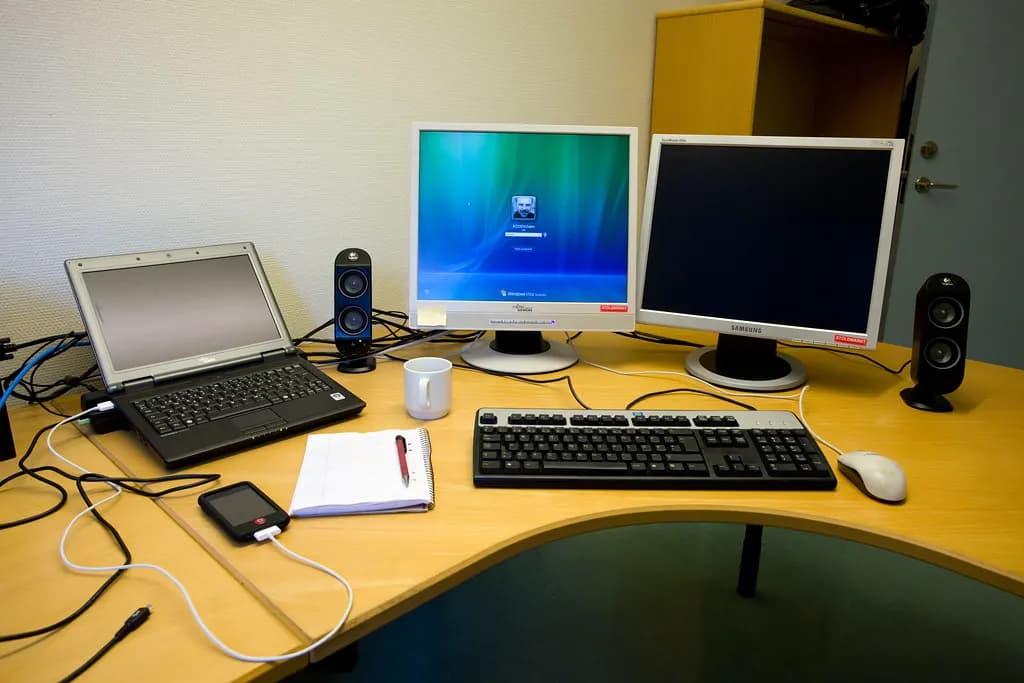
Sharma Fabricators in Pune (GSTIN starting 27) supplies 200 machined brackets at ₹85 each and a laser-cutting job for ₹4,500 to Patil Auto Components in Chakan, also in Maharashtra. Both lines carry 18%. Because the buyer's state code (27) matches the supplier's, the template charges CGST and SGST.
- Bracket line: 200 × ₹85 = ₹17,000 taxable; CGST ₹1,530; SGST ₹1,530
- Laser cutting: ₹4,500 taxable; CGST ₹405; SGST ₹405
- Totals: taxable ₹21,500; CGST ₹1,935; SGST ₹1,935; invoice total ₹25,370
If the same goods went to a buyer in Bengaluru (state code 29), the formulas would switch to IGST of ₹3,870 on the same ₹21,500, and the place of supply would read 29-Karnataka. If Sharma Fabricators' turnover had crossed ₹5 crore in any year since 2017-18, it would have to upload this invoice to the IRP before issuing it. To check any tax figure quickly, use the GST calculator; our guide on how to calculate GST explains inclusive and exclusive pricing.
Common invoice mistakes and how to fix them
Wrong tax type. Charging CGST and SGST on an inter-state sale (or IGST on an intra-state one) is a real error, not a formatting slip. Under section 77 of the CGST Act and section 19 of the IGST Act, you pay the correct tax and claim a refund of the wrong one, so get the place of supply right first.
Missing buyer GSTIN. A B2B invoice without the buyer's GSTIN goes into the B2C table of GSTR-1, and the buyer can't see it in GSTR-2B. Validate the GSTIN on the GST portal's search taxpayer page before billing a new customer.
Broken numbering. Two invoices with the same number, or gaps you can't explain, attract questions in scrutiny. Use the register sheet and never edit an issued invoice's number.
Invoicing services late. Issuing a services invoice after 30 days doesn't change your time of supply, so tax and interest can still be due from the earlier date.
What to do next
If you're starting out, build the template once, test it with a same-state and an other-state invoice, and keep the register sheet up to date — it doubles as your GSTR-1 working. If you'd rather skip the formulas, our free invoice generator produces a Rule 46 invoice with HSN, tax split and amount in words, and the proforma invoice generator handles quotes. When your turnover approaches ₹5 crore, read the e-invoice guide and move to IRP-based invoicing before the first invoice of the year in which you cross it.
This is general information, not legal or tax advice — confirm on the official source or with a professional.
Frequently asked questions
Rule 46 requires the supplier's name, address and GSTIN; a serial number of up to 16 characters; the date; the buyer's name, address and GSTIN if registered; HSN or SAC; description; quantity and unit; taxable value after discounts; tax rate and amount for CGST, SGST/UTGST or IGST; place of supply for inter-state sales; whether reverse charge applies; and a signature. E-invoices also carry the QR code with the IRN.
Set up a header with your name, address and GSTIN, then cells for invoice number, date, buyer details and place of supply. Add an item table with description, HSN, quantity, rate and taxable value, and use formulas to work out CGST and SGST (same state) or IGST (different state). Round each tax to two decimals, show the total and amount in words, and save each invoice as a PDF.
An invoice number can have up to 16 characters, using letters, digits, hyphen (-) and slash (/) only. It must be consecutive and unique within a financial year, though you can run separate series — for example per branch or for exports. A common format is prefix/year/number, such as SF/26-27/0142.
A bill of supply is issued when no GST is charged: by composition taxpayers, and for exempt or non-taxable supplies. It has the same basic details as a tax invoice — supplier GSTIN, serial number, date, buyer details, HSN, description and value — but shows no tax. Composition dealers must also print 'composition taxable person, not eligible to collect tax on supplies'.
E-invoicing applies to B2B invoices, exports and credit or debit notes of businesses whose aggregate turnover exceeded ₹5 crore in any financial year from 2017-18 onwards. Below that, an Excel or software invoice that meets Rule 46 is valid. Businesses above ₹10 crore must report invoices to the IRP within 30 days of the invoice date.
Yes, as long as it contains every particular required by Rule 46 and you aren't covered by e-invoicing. Electronic invoices don't need a physical signature. For goods, keep the original for the buyer, a duplicate for the transporter and a triplicate for yourself; for services, an original and a duplicate. Keep them for 72 months from the due date of the annual return.
Sources & verification
Figures on this page were checked against the sources below when it was last reviewed on 9 October 2026. Each rate and limit is stored once with its own official source and review date, and official update channels are monitored daily so changes are picked up. How we verify
- 1.Rule 46 – CGST Rules (tax invoice) — CBIC · accessed 9 October 2026
- 2.Rule 47 – CGST Rules (time limit for issuing tax invoice) — CBIC · accessed 9 October 2026
- 3.Rule 48 – CGST Rules (manner of issuing invoice) — CBIC · accessed 9 October 2026
- 4.Rule 49 – CGST Rules (bill of supply) — CBIC · accessed 9 October 2026
- 5.Section 31 – CGST Act, 2017 (tax invoice) — CBIC · accessed 9 October 2026
- 6.Section 36 – CGST Act, 2017 (retention of accounts) — CBIC · accessed 9 October 2026
- 7.Section 170 – CGST Act, 2017 (rounding off of tax) — CBIC · accessed 9 October 2026
- 8.Notification No. 10/2023 – Central Tax (e-invoice threshold) — CBIC (hosted by GST Council) · accessed 9 October 2026
- 9.Revised time limit for e-invoice reporting (AATO ₹10 crore and above) — GSTN e-invoice portal · accessed 9 October 2026
MSMETOOLS is an independent platform and is not affiliated with any government agency, ministry or department.
Tools for this
Invoice Generator
Create professional invoices with tax, logo and custom details.
GST Calculator (India)
Calculate GST for your sales and purchases with current rates.
HSN Code Finder (India)
Find the correct HSN/SAC code for your product.
Proforma Invoice Generator
Send advance invoices before supply.
Related guides
 Delivery Challan Format 2026: Rule 55 Fields & GST RulesRead guide
  How to Calculate GST in 2026: Formulas, Slabs & ExamplesRead guide
  What Is a Credit Note & Debit Note in GST? Rules 2026Read guide
  HSN Code List 2026: Digits, Lookup & Rates for Common GoodsRead guide
 Official links open the government site in a new tab.